
Appearance
Payments & billing
▶ Watch — a quick walkthrough of billing
Two separate things live under Setup: Payments (how your customers pay you) and Billing (how you pay for Retailer OS).
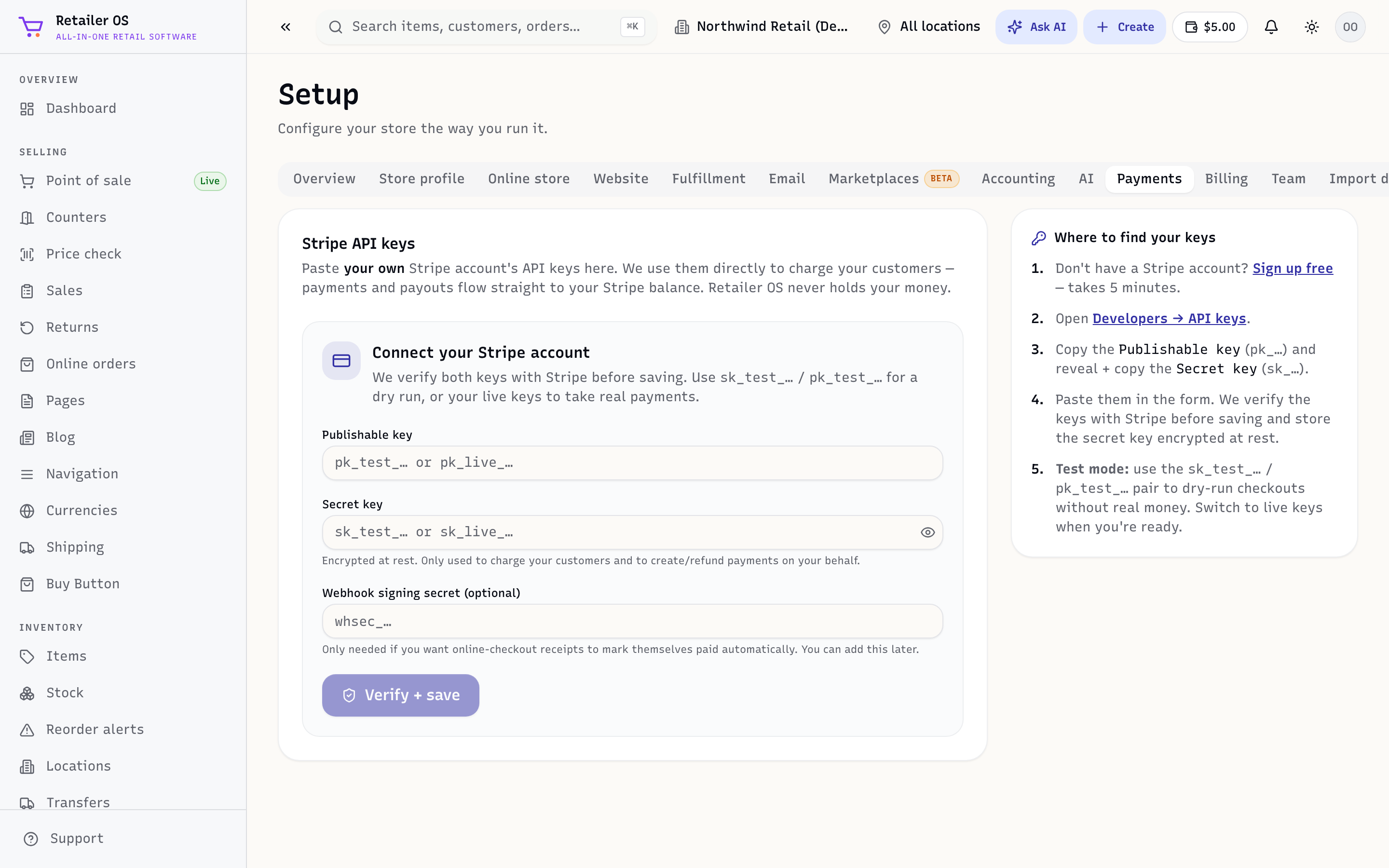
Payments — take card payments
Under Setup → Payments, connect a card processor. Once connected you can:
- Take cards at the counter, and
- Accept payments on your online store and marketplaces.
Card sales then flow into Sales & Orders and the Payment Mix report.
TIP
Connect payments early — it's the one thing that unblocks both in-store card sales and online checkout.
Setup → Payments is also where you pair a Stripe card reader (In-store card payments) and connect a Cash drawer that opens when you take cash. See Hardware & cash drawer.
Billing — your Retailer OS plan
Setup → Billing holds everything you pay for Retailer OS, all on one card, across three tabs:
- Plans & Modules — your stores, users, and add-ons, plus an optional Messaging & AI plan.
- Storage — how much file and record storage you're using.
- Invoices — your next scheduled charge, and every past charge with a downloadable receipt.
NOTE
Billing is managed on the web only — the Retailer OS iOS app (coming soon to the App Store) has no purchases. To change your plan, sign in at app.retaileros.ai in a browser.
Stores, users, and add-ons
| Line | Price | What it covers |
|---|---|---|
| Stores | $99.99/mo each | Each active store or location. Required. |
| Users | $9.99/mo each | Each user seat — the owner counts as one. Required. |
| Online store | $99.99/mo | Add-on: your public storefront and checkout. See Online Store. |
| Amazon | $99.99/mo | Add-on: Amazon order and inventory sync. See Marketplaces. |
| eBay | $99.99/mo | Add-on: eBay order and inventory sync. |
| Website | $19.99/mo | Add-on: an AI-generated marketing website with your online store built in. |
- New accounts start with a 14-day free trial — no card required.
- Choose Monthly or Annual billing; annual saves 17%.
- Add or remove stores, users, or add-ons whenever you like — the subscription adjusts without re-entering your card. Add-on changes prorate at the next cycle, and if you cancel, access continues through the period you've paid for.
Messaging & AI plan
The Messaging & AI plan covers customer messaging from Campaign Studio — SMS, email, and the unified inbox from your own texting number — plus a monthly AI usage allowance for Ask AI, snap-to-add, demand forecasting, and the merchandising assistant. Every tier unlocks every AI feature; tiers differ only in how much messaging and AI usage they include.
| Plan | Price | Included each month |
|---|---|---|
| Starter | $39.99/mo | 1 texting number · 100 SMS · 500 emails · light AI usage — great for a single store getting started |
| Growth | $69.99/mo | 1 texting number · 250 SMS · 3,000 emails · standard AI usage — for stores using SMS, email and AI every day |
| Pro | $99.99/mo | 1 texting number · 400 SMS · 4,000 emails · high-volume AI usage — for power users and multi-location operators |
The texting number is for stores on a paid plan. You can choose the Messaging & AI plan during the free trial, but you get the number under Setup → SMS once your store plan is paid.
Each month your plan also adds credit to your AI wallet — the balance shown in the top bar and on the Usage & Credits card under Setup → AI. Unused AI credit carries over, up to three months' worth.
Usage beyond your plan — SMS, email, or AI — is added to your next invoice as Usage beyond plan, so there's nothing to top up. The plan card shows this month's usage and the charges so far; if you reach your usage limit, charged sends pause until the next invoice. To stop, click Turn off on the card.
Voice calling is billed separately, pay-as-you-go, for stores that use it — it isn't part of the Messaging & AI plan.
Invoices
The Invoices tab shows your next charge at the top, marked Scheduled, with its date and total. Once it's paid it moves into your history, where every charge — subscription, Usage beyond plan, and any AI wallet top-up — has a downloadable receipt.
NOTE
Some features — for example the online store or marketplace sync — depend on your plan. If a screen is missing, check Billing.